Every SKU carries its Shopify vendor, read on each sync
If you want a Shopify inventory app that uses the vendor field you already fill in, this is the part of Restoc that does it: each tracked SKU carries the vendor from its Shopify product, read on every scheduled sync. The name then sits beside current stock and days of inventory on the dashboard and on each line of the weekly reorder report, and a vendor lead times screen lets you set the wait once
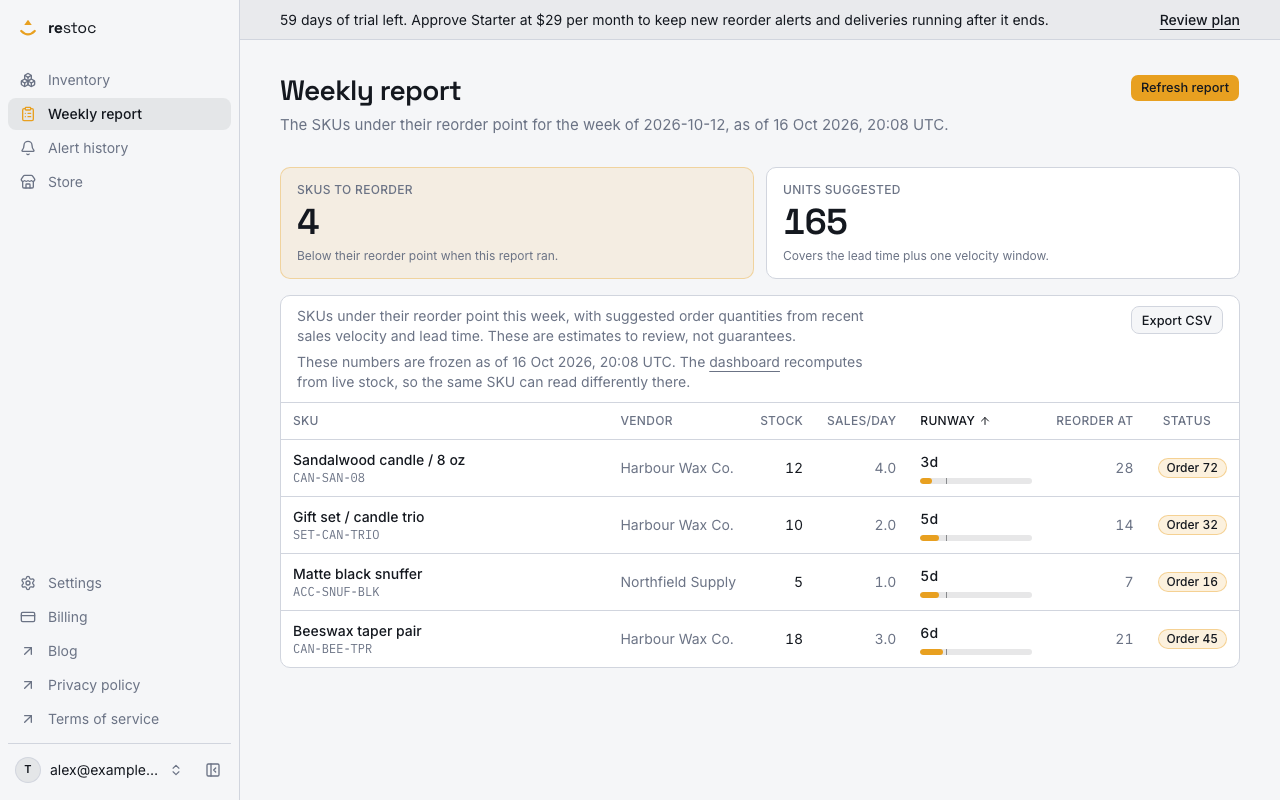
A screenshot of Restoc, which is not open yet, showing sample data. Nothing in it is a promise: what the product does is what this page says in words.
A reorder list that does not say who to call
The list tells you what is running low. The next question is always who to send the order to, and how long that company takes, and that is where most stock tools go quiet.
Shopify already holds the first half of the answer. Every product record has a vendor field, and for most stores it is filled in, because it came off a supplier invoice or an import sheet at the time the product was created. Your product record calls that company the vendor. On the warehouse floor you call it the supplier. Same company, two words.
The trouble is that a reorder list ordered by product title spreads one supplier's items across the whole page. With a few hundred SKUs you can hold it in your head. At a thousand or two thousand you cannot, so the week ends with a CSV open in a spreadsheet, sorted by hand into groups, because one supplier means one email, one minimum order and one lead time, not eleven separate decisions.
Lead time is the second half of the same problem. A reorder point is only as useful as the number of days you expect to wait, and that number belongs to the supplier, not to the SKU. Typing it into hundreds of SKUs one row at a time is not a job anyone does twice.
Restoc is built so the grouping is already done and the wait is entered once. The vendor travels with the SKU from Shopify into the dashboard and into the weekly reorder report, and a vendor lead times screen fills the lead time for every SKU that does not carry its own. The question changes from "what is low" to "what do I owe this supplier this week".
How the vendor gets onto every SKU
- Connect the store once
Restoc installs through Shopify OAuth and then pulls inventory levels and sales history through webhooks and a scheduled sync job. It is a web app: there is no mobile app and no browser extension to install.
- The sync reads the product's vendor
On each scheduled sync, the vendor text on the Shopify product is written onto the SKU record Restoc keeps. The column is nullable, so a product with no vendor in Shopify stays blank here rather than being guessed at.
- Every variant inherits it
The name is read from the product, so each variant under that product carries the same vendor. Sizes and colours that deplete at different speeds still group under one supplier when you come to order.
- Set the lead time once per supplier
A vendor lead times screen in settings lists every distinct vendor found in your catalogue with a lead time against it. Save a supplier's days once and every SKU of theirs that has no lead time of its own uses it in its reorder point.
- The dashboard shows it beside the numbers
Per active SKU, the dashboard shows current stock, days of inventory remaining and reorder status. The vendor sits alongside, so the rows closest to a stockout can be read as supplier names, not just product names.
- The weekly report carries it onto the order
The weekly reorder report lists every SKU below its reorder point with a suggested order quantity, and shows the vendor on the line. That is the sheet you work from on a Monday, and it exports as CSV.
What that changes on an ordering day
Order by supplier, not by alphabet
The week's reorder list can be read in supplier blocks. One scan, one order per supplier, instead of reading the same name eleven times in eleven different places on the page.
One lead time, not four hundred
Set a supplier's lead time on the vendor lead times screen and it feeds the reorder point of every SKU of theirs that has no lead time entered. No row-by-row typing to get the first numbers right.
No second supplier list to maintain
The vendor comes from Shopify on every sync. Fix a name on the product in Shopify and the next sync carries the fix through. Restoc never asks you to retype what Shopify already stores.
Variants stay together
Because the vendor is read from the product, a size run or a colourway does not scatter. You see one supplier with four lines under it, which is how the purchase order is going to look anyway.
Blank is shown as blank
If a product has no vendor in Shopify, the field is empty in Restoc. An empty cell is useful information: it tells you which products in your catalogue have no supplier recorded anywhere yet.
Where the vendor appears
| Where | What it carries | Why it matters |
|---|---|---|
| Shopify product | The vendor field you already fill in | The one place the name is edited, so there is nothing to keep in step |
| Restoc dashboard | Vendor beside current stock, days of inventory remaining and reorder status per active SKU | See which supplier owns your soonest stockouts |
| Weekly reorder report | Vendor on each SKU below its reorder point, with a suggested order quantity | Write one order per supplier instead of one line at a time |
| Vendor lead times, in settings | Every distinct vendor in your catalogue, with one lead time each | Fills the lead time for SKUs that have none of their own, so reorder points land without row-by-row typing |
| Email or Slack alert | The SKU that crossed its reorder point, by email, and by Slack webhook on Growth and Pro | The warning arrives first; the vendor is on the dashboard row you open next |
What the vendor field does here, and what it does not
We would rather be plain about the edges of this than let you find them later.
It is read, not edited
The vendor is pulled from Shopify. There is no vendor editor inside Restoc, because two places to change one name is how records go wrong. Change it on the product in Shopify and the next scheduled sync brings it over.
It is a grouping key, not a supplier record
Shopify's vendor field is a line of text. It holds no contact, no minimum order value, no payment terms. Restoc uses it for two jobs only: grouping your stock list, and hanging a lead time on the company rather than on each SKU.
Lead time: the SKU first, then the vendor
A SKU with its own lead time keeps it. A SKU with none takes the lead time saved against its vendor. Either way, the reorder point is calculated from that lead time and your sales velocity window of 7, 14 or 30 days.
What is stored on the SKU
A tracked SKU record holds the title, your own SKU code, the Shopify variant id, current stock, lead time and the computed reorder point. Restoc reads products, inventory levels and orders from your store to work those out, and nothing more of the order than the quantity, the date and the Shopify reference.
One location
Plans track a single location. If you hold stock in more than one place, say so before you sign up rather than after.
Questions
Where does the vendor come from?
From the vendor field on the Shopify product. Restoc's scheduled sync reads it and writes it onto the SKU record, so nothing is typed into Restoc by hand.
What happens if a product has no vendor in Shopify?
The field stays empty on that SKU. The column is nullable by design: Restoc will not invent a supplier name, and an empty cell shows you which products have no vendor recorded yet.
Can I edit the vendor inside the app?
No. Shopify is the single place the name lives. Edit it on the product there and the next scheduled sync carries the change through to the dashboard and the next weekly report.
Do variants get their own vendor?
The vendor is read from the product, so every variant under that product carries the same name. Sizes and colours keep their own stock, velocity and reorder point, but they group under one supplier.
Can I set one lead time for a whole supplier?
Yes. The vendor lead times screen in settings lists each distinct vendor in your catalogue with one lead time against it, and that figure is used by every SKU of that vendor which has no lead time of its own.
What if a SKU already has its own lead time?
It keeps it. A per-SKU lead time wins; the vendor lead time only fills the SKUs that have none, which is usually most of the catalogue on the first week.
Can I get the reorder list out of the app?
Yes. The weekly reorder report is viewable in the app and exportable as CSV, listing the SKUs below their reorder point with a suggested order quantity.
What does it cost?
Starter is $29 a month for up to 200 tracked SKUs, Growth is $59 for up to 1,000 and Pro is $99 for up to 2,000, each with a 60-day free trial and two months free if you pay yearly. The pricing page sets out what sits in each tier.