Shopify inventory app SKU limits: what each plan tracks
Nearly every Shopify inventory app puts a ceiling on how many SKUs it will watch, and that ceiling, more than the feature list, decides what you pay. Restoc has three: 200 tracked SKUs on Starter at $29 a month, 1,000 on Growth at $59, and 2,000 on Pro at $99, with the count checked on the server each time your store syncs.
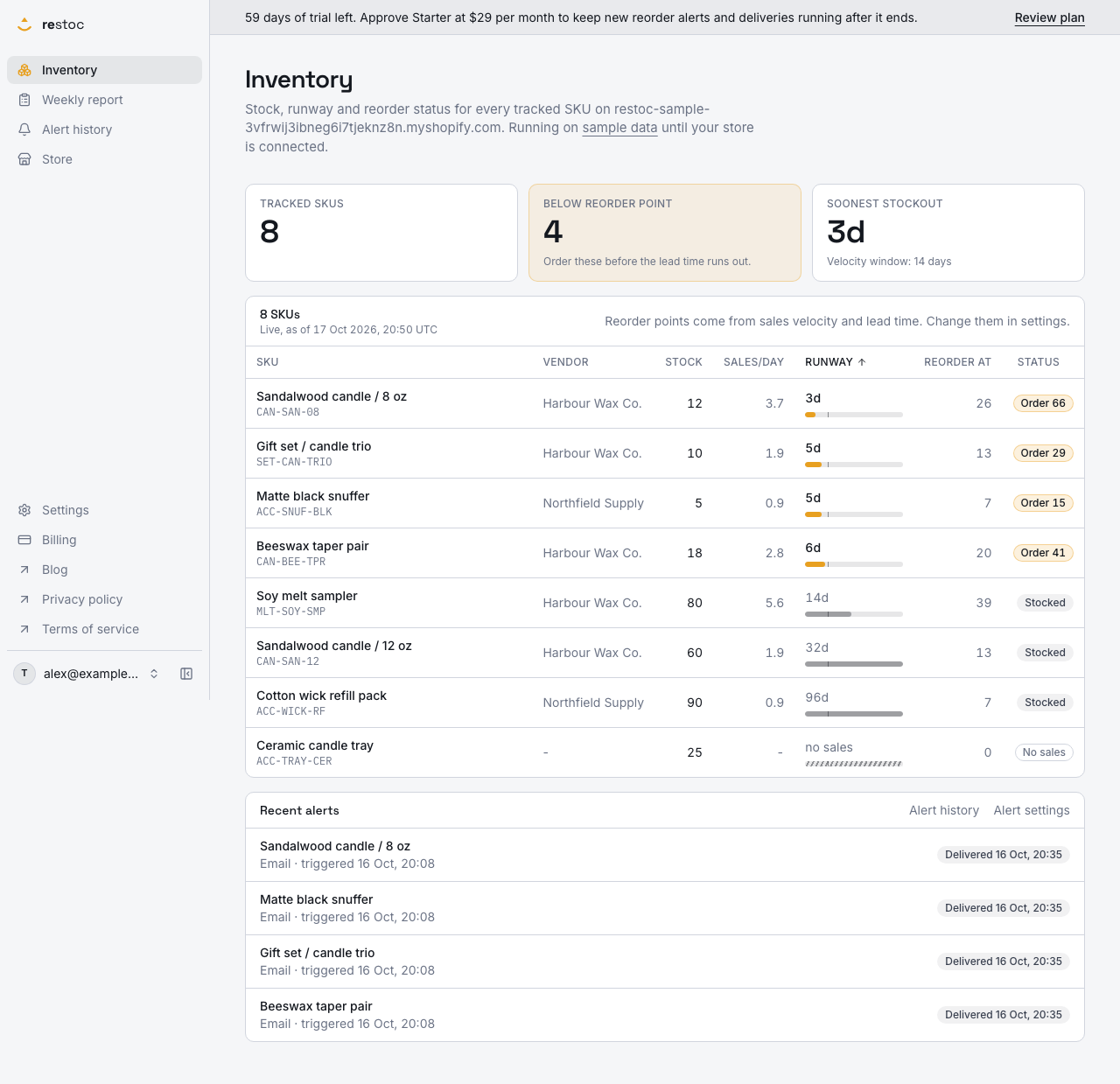
A screenshot of Restoc, which is not open yet, showing sample data. Nothing in it is a promise: what the product does is what this page says in words.
What a SKU limit means in an inventory app
A SKU limit is the number of stock-keeping units the app will keep an eye on. In Shopify terms that means variants, not products. A candle in three sizes is three SKUs. A tee in five sizes and four colours is twenty.
Watching stock is per-SKU work, so most inventory apps price on that number. Restoc does the same, with three tiers:
- Starter, $29 a month, up to 200 tracked SKUs
- Growth, $59 a month, up to 1,000 tracked SKUs
- Pro, $99 a month, up to 2,000 tracked SKUs
Each tier covers one location. Each carries a 60-day free trial. The subscription is billed by Shopify on your Shopify invoice, not as a separate card payment.
The core work sits on every tier: a reorder point per SKU from your sales velocity and lead time, a store-wide velocity window of 7, 14 or 30 days, email alerts when a SKU crosses its reorder point, a weekly reorder report with suggested order quantities you can export as CSV, and a dashboard showing days of inventory remaining per SKU. Growth adds Slack alerts through an incoming webhook alongside email. Pro adds a per-SKU velocity window override.
So if your catalogue is 180 variants and climbing, the decision in front of you is not which tier has the feature you need. It is how much headroom you want before the cap starts holding new SKUs back.
Tracked SKU limits by plan
| Plan | Tracked SKUs | Locations | Monthly | Billed yearly |
|---|---|---|---|---|
| Starter | 200 | 1 | $29 / month | $290 / year |
| Growth | 1,000 | 1 | $59 / month | $590 / year |
| Pro | 2,000 | 1 | $99 / month | $990 / year |
How the cap is enforced
- You install Restoc on your store
The Shopify install flow grants read access to products, inventory levels and orders. Stock and sales then arrive through webhooks plus a scheduled sync job. Restoc is a web app: there is no mobile app and no browser extension.
- The sync counts your tracked SKUs
Every sync reads your catalogue and keeps one tracked SKU row per variant: title, your own SKU code, the Shopify variant id, the product's vendor, current stock, lead time and the computed reorder point. That row count is what the cap applies to.
- The cap is checked on the server, at sync time
Not a hint in the interface that a determined merchant can click past. The limit for your tier is applied where the data is written, so SKUs beyond it are not taken on until the plan goes up, and the sync answers with a readable over-limit message rather than a silent truncation.
- The app shows usage against your limit
When your tracked SKU count approaches or passes the cap, the dashboard and billing settings show current usage versus the limit, with a direct upgrade route rather than a quiet failure.
- An upgrade raises the cap on your Shopify invoice
Moving from Starter to Growth or Pro goes through Shopify's own subscription billing, so the charge lands on your existing Shopify invoice. No second card on file, no separate payment relationship.
Why the limit is set up this way
Priced on catalogue size, not on seats
The number you are buying is tracked SKUs: 200, 1,000 or 2,000. Count your Shopify variants and you know your tier before you install anything.
Server-enforced, so the number is real
The cap for your tier is applied inside the sync, which means the figure on the pricing page is the figure the app holds you to. You are never quietly tracking more than you pay for, or fewer.
One bill, through Shopify
Starter, Growth and Pro are charged by Shopify on your Shopify invoice. Payment details stay with Shopify and never reach us.
Sixty days to find your real SKU count
Every tier opens with a 60-day free trial, long enough to watch a full reorder cycle and see where your variant count actually sits before the first charge.
Two months off for paying yearly
Each tier has a yearly price at ten months' money for twelve: $290, $590 or $990, on the same SKU limits.
A high cap only helps if you can fill the inputs
A 1,000 or 2,000 SKU ceiling is worth nothing if setting the app up means typing a number into every row. Three things carry that weight.
Lead time by vendor, not by SKU
Each sync reads the vendor from the Shopify product and stores it against the SKU, and that vendor shows on the dashboard and the weekly report. A vendor lead times screen lists every distinct vendor in your catalogue with one lead time field each. A SKU with no lead time of its own takes its vendor's. A 900-SKU catalogue bought from 20 suppliers is 20 numbers to enter, not 900.
Safety stock as one percentage
The reorder point calculation takes a store-wide safety stock percentage on top of lead-time demand, for the items that sell in bursts rather than evenly. The units that buffer adds appear as their own column on the dashboard SKU table, in the weekly reorder report and in the CSV export, so you can see what it is doing instead of guessing at it.
A long list sorted by urgency
The dashboard sorts by days of inventory remaining and reorder status, soonest to stock out first. On a 2,000-row Pro catalogue, that is the difference between a list and a work queue.
Choosing a tier you will not outgrow next quarter
Three practical trade-offs.
If you are under 200 variants
Starter is the fit, and it is not a stripped tier: reorder points, the velocity window, email alerts, the weekly reorder report with suggested order quantities, the CSV export and the days-of-inventory dashboard are all there. The watch-out is growth. If you add a size run or a colourway each season, 200 fills faster than it reads.
If you are between 200 and 1,000
Growth at $59 is five times Starter's capacity, and it is also where Slack alerts arrive, posted to an incoming webhook alongside the email alert. If the person who places purchase orders lives in a Slack channel rather than an inbox, that matters more than the extra headroom.
If you are between 1,000 and 2,000
Pro at $99 is the top tier at 2,000 tracked SKUs, and it adds a per-SKU sales velocity window override, so a slow seasonal line can be read over 30 days while a fast mover is read over 7. Above 2,000 SKUs, Restoc is not the right tool yet, and we would rather say that plainly than sell you a cap we do not have.
On locations
Every tier covers one location. If you need separate reorder points per warehouse or per store, that is not something Restoc does today.
Two things the cap does not buy you, whichever tier you pick: Restoc does not forecast demand, and it does not raise a purchase order. Both have their own page in this section, and both say exactly where the line falls.
Restoc is still in build and opens by waitlist, so these are the plans and limits it is being built to, with the caps enforced in the sync rather than written on a page and forgotten.
Questions
What counts as one tracked SKU?
One Shopify variant. Restoc keeps a tracked SKU row per variant with its title, your own SKU code, the Shopify variant id, the vendor, current stock, lead time and computed reorder point, and the plan cap applies to that count. A product with multiple sizes or colours counts once per variant.
What happens if my store has more SKUs than my plan allows?
The cap is enforced on the server at sync time, so SKUs beyond your tier's limit are not taken on, and the sync returns a readable over-limit message instead of a silent partial catalogue. The app shows your current usage against the limit on the dashboard and in billing settings, with a route to the next tier.
What are the SKU limits on each plan?
Starter tracks up to 200 SKUs at $29 a month, Growth up to 1,000 at $59, and Pro up to 2,000 at $99. Paid yearly those are $290, $590 and $990, with the same limits.
Do the SKU limits apply during the free trial?
Yes. Each plan carries a 60-day free trial on the tier you pick, and that tier's cap is the one enforced while you trial. The trial is also built so at least one full weekly reorder cycle completes before any first charge.
Can I move up a tier later?
Yes. There are three tiers, Starter, Growth and Pro, and moving up raises your enforced SKU cap. The subscription change goes through Shopify's own billing, so it appears on your Shopify invoice rather than as a separate card payment.
Do I have to set a lead time for every SKU?
No. The sync stores each SKU's vendor from Shopify, and a vendor lead times screen lets you set one lead time per vendor. Any SKU without a lead time of its own uses its vendor's, so a large catalogue is set up supplier by supplier rather than row by row.
Is there a tier above 2,000 SKUs?
No. Pro at 2,000 tracked SKUs is the largest plan, and Restoc is built for stores in the 50 to 2,000 SKU range. If you are past that, we are not the right fit yet.
Does the limit cover more than one location?
Every plan covers one location. Per-location reorder points are not part of Restoc today.