Test a low stock alert before you rely on it
If you want a Shopify low stock alert app you can test before you trust it, that is what the send test alert button in Restoc's alert settings is built for. It fires a sample message through the Slack webhook you just saved, so delivery is something you have watched rather than something you assume.
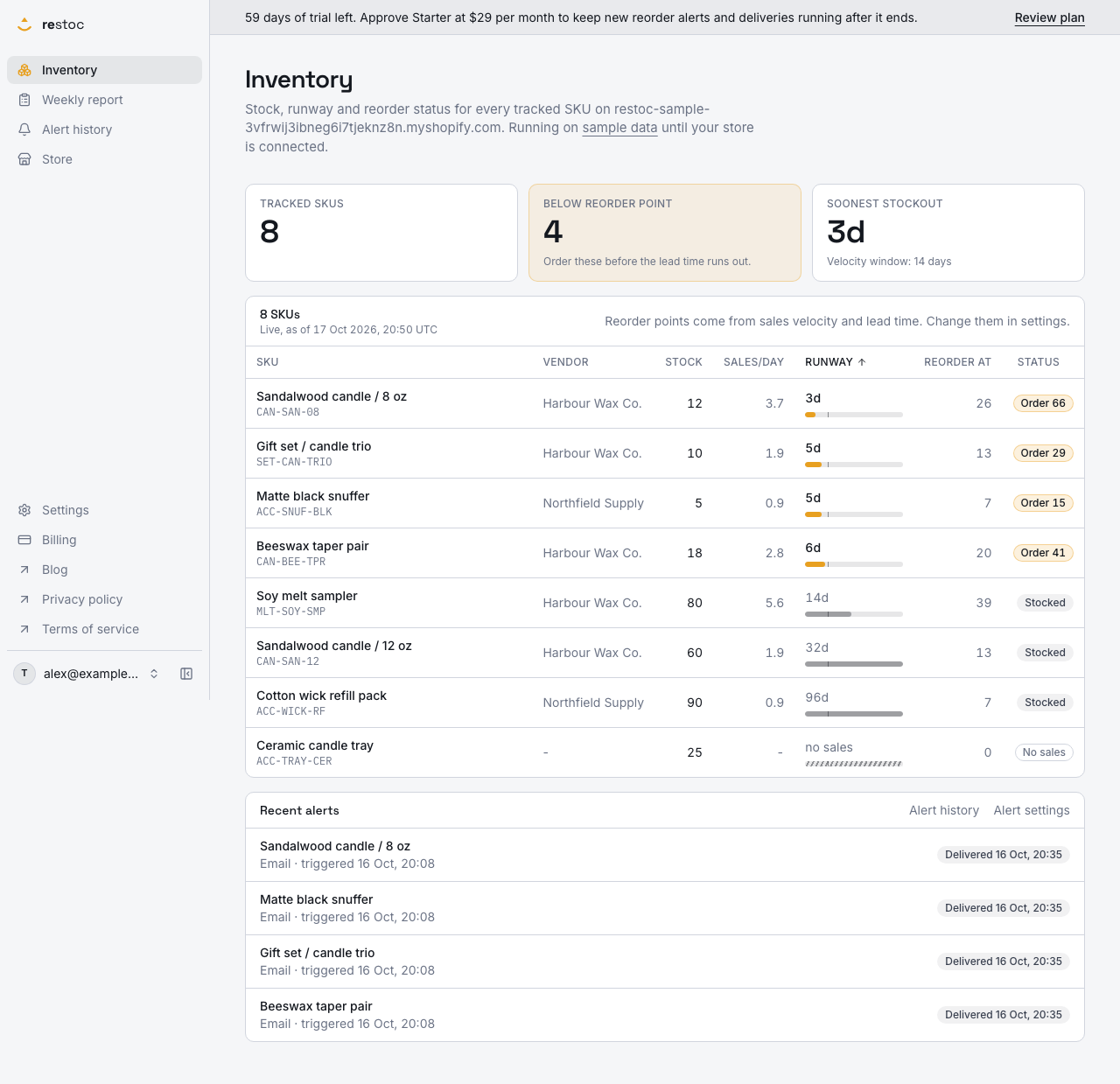
A screenshot of Restoc, which is not open yet, showing sample data. Nothing in it is a promise: what the product does is what this page says in words.
An untested alert channel is a guess
The sequence is familiar. You create an incoming webhook in Slack, paste the URL into an app, press save, and the form says saved. Nothing else happens, because nothing is supposed to happen until stock gets low.
Weeks later a hero SKU runs down and you find out the hard way. The URL had a character missing. It pointed at a channel someone archived. It belonged to a Slack app that was removed in a workspace clean-up. The app was fine, the stock math was fine, and the message went nowhere.
Running out of stock is a real financial hit, and the worst version of it is the one you thought you had covered. A reorder alert is worth exactly as much as the delivery you can prove.
So Restoc is built to do two things at the point of setup. It checks the Slack webhook URL against the expected format before it saves, so a malformed URL fails at the keyboard instead of silently at three in the morning. Then it gives you a send test alert button that fires a sample message through the webhook you just saved, so you confirm delivery before a real stockout depends on it.
How the test send works
- Create the incoming webhook in Slack
One channel, one URL. Decide now whether that channel is one someone actually reads on a Monday morning. Our webhook walkthrough covers the Slack side click by click.
- Paste it into Settings, Alerts
Restoc validates the URL against the expected webhook format before it stores it. A URL in the wrong shape is refused with a message, so you are not left with a saved field that can never deliver.
- Press send test alert
Restoc fires a sample reorder alert message straight through the webhook you configured. This is a test message, not a real SKU crossing, so you can run it before your catalogue has any sales history behind it.
- Go and look at the channel
If the message is there, the channel is proven: the URL, the Slack app, the channel permissions, the lot. If it is not there, you are fixing a setup problem on a quiet day rather than during a stockout.
- Then leave the real alerts to the job
From that point, alerts fire when a tracked SKU crosses its reorder point, delivered through a background job to email, to Slack, or both, and each one is recorded with its delivery state.
What you get from testing first
Delivery you have watched, not a saved form
A green save state tells you a string went into a database. A message in your channel tells you the alert path works end to end. Only one of those is evidence.
A bad webhook URL caught at the keyboard
The URL is checked against the expected format before it saves, so the common failure, a truncated or mistyped paste, is refused immediately instead of sitting dormant for a month.
One alert per crossing, not a stream
Real alerts are delivered through an idempotent background job, so a repeated pass over the same crossing does not turn one low stock event into a run of duplicate messages in the channel.
A delivery record for the alerts that follow
Alerts that have fired are listed on the dashboard with their channel, the time the crossing was detected and whether delivery completed. The list holds the most recent eight.
A check you can repeat whenever Slack changes
Workspaces get tidied, apps get revoked, channels get archived. The test send is there to run again after any of that, rather than discovering the break through a missed reorder.
What the test send proves, and what it does not
| Question | Does the test send answer it? |
|---|---|
| Is the Slack webhook URL in the right format? | Yes. It is validated before the setting saves. |
| Does a message actually reach that channel? | Yes. That is the point of the test send. |
| Will email alerts arrive? | Not on demand. There is no email test send today, but every email alert that fires carries a delivery state on the dashboard. |
| Did the last real alert get delivered? | Not the test send itself. The dashboard's list of recent alerts answers that, for the most recent eight. |
| Is my reorder point set at the right number? | No. That comes from your sales velocity window and the lead time you enter per SKU. |
| Will the alert fire at the right moment? | No. It confirms the channel. The crossing is evaluated against each SKU's reorder point. |
Where the test send sits in the alert path
A test send proves the pipe. The alerts themselves come from somewhere else.
Restoc watches each tracked SKU against its reorder point. When a SKU crosses, an alert is fired through a background job to email, to your Slack webhook, or both. The job is idempotent, one alert per SKU per channel per crossing, which is what keeps one low stock event from becoming a stream of repeats when a pass runs again.
Email and Slack are separate settings
- Email alerts go to your account email address from the moment you connect a store, until you change the address or switch email alerts off in Settings, Alerts. They are sent through Amazon SES.
- Slack alerts go to the incoming webhook you configure. Slack alerts are part of Growth at $59 / month and above, alongside email. Starter at $29 / month sends email alerts.
After the test, the dashboard keeps the record
Every alert that fires is listed on the dashboard with the channel it used, when the crossing was detected and whether it was delivered. That list holds the most recent eight alerts, so treat it as a check on the last stretch of trading rather than a full archive.
The honest summary is this. The test send covers Slack. For email there is no test button today, and we would rather say that plainly than imply a check exists. What email has instead is the delivery state on that dashboard list, so you can tell whether the last alert left the building, and if it did not, the ordinary checks start with the address in your alert settings.
Questions
Can I send a test low stock alert without waiting for a SKU to run down?
Yes, for Slack. The send test alert button in Settings, Alerts fires a sample message through your configured webhook on demand, so you can prove delivery on the day you set it up rather than at the first real crossing.
Is there a test send for email alerts?
Not today. The test send fires through the Slack webhook. Email alerts are delivered when a SKU crosses its reorder point, to the address in Settings, Alerts, through Amazon SES, and each one is listed on the dashboard with whether it was delivered. When an email test send exists, we will say so here.
What does the test message contain?
A sample reorder alert message, sent through the webhook you saved. It is a test, not a real crossing, so it does not mean one of your SKUs is low.
Where can I see which alerts have actually been delivered?
On the dashboard. Alerts that have fired are listed with their channel, the time the crossing was detected and their delivery state. The list keeps the most recent eight, so it answers the recent question rather than giving you a full history.
Which plan do I need for Slack alerts and the test send?
Slack alerts through an incoming webhook are part of Growth at $59 / month and Pro at $99 / month. Starter at $29 / month covers email alerts, the weekly reorder report and the dashboard. Every plan carries a 60-day free trial.
What if the test message does not arrive?
Then you have found the problem on a quiet day. Check the webhook URL you pasted, the channel it was created for, and whether the Slack app behind it still exists in your workspace. Our page on no alert arrived walks the checks in order.
Will testing create duplicate alerts later?
No. The test send is a one-off sample message. Real alerts are delivered through an idempotent background job, one per SKU per channel per crossing, so a repeated pass does not resend.
Should I re-test after changing anything in Slack?
Yes. Rotating a webhook, archiving a channel or removing an app all break delivery quietly. The test send is cheap to run, so run it after any workspace change you would not want to discover through a missed reorder.