Still checking stock in a spreadsheet? What an alert changes
If your stock control lives in a spreadsheet you export from Shopify and update when you remember, this page is the alternative to that habit. Restoc is built to read your inventory levels and order history from Shopify, set a reorder point per SKU from sales velocity, lead time and a safety stock buffer, and message you when a SKU crosses it, so nobody has to open a workbook to find out.
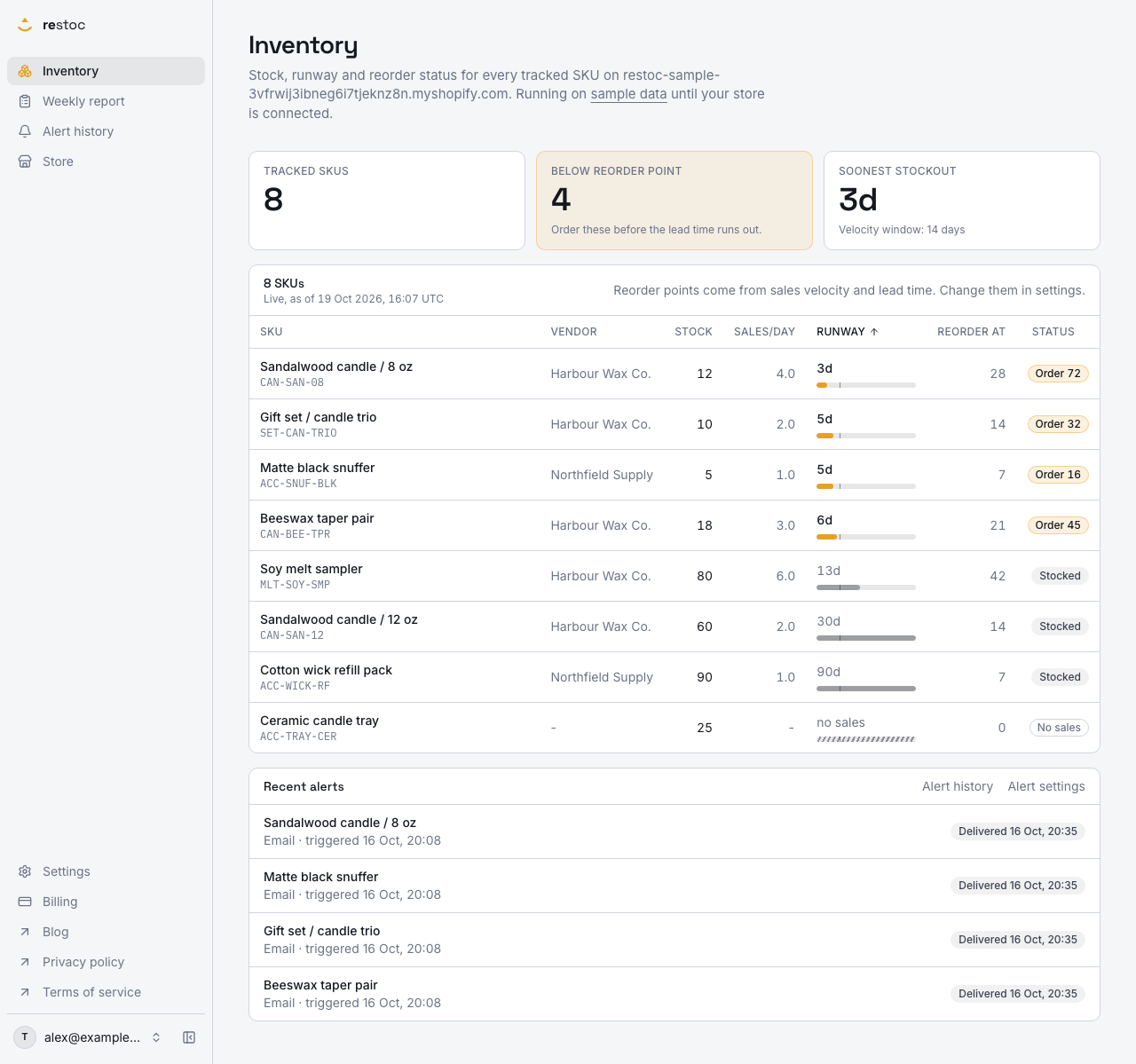
A screenshot of Restoc, which is not open yet, showing sample data. Nothing in it is a promise: what the product does is what this page says in words.
The workbook that knows, but never tells you
You know the file. Tab one is a CSV you exported from Shopify. Tab two holds formulas you wrote eighteen months ago. One column actually gets read: how many days of stock are left on the SKUs that pay the bills.
It works right up to the point where it does not get opened. Stock moves every hour. The workbook moves when you sit down with it, and you sit down with it in the gap between packing orders and chasing a supplier who has gone quiet. By Thursday you are deciding on Sunday's numbers.
Restoc is built to replace that habit rather than to be a bigger sheet. It installs on your Shopify store, reads inventory levels and order history, calculates a reorder point per SKU from your sales velocity, the lead time you set and a store-wide safety stock percentage, shows days of inventory remaining on a dashboard, and sends an alert when a SKU crosses its reorder point. Same arithmetic you were doing. Nobody has to remember to run it.
The job here is smaller than the software usually sold for it. You are not planning a season or running a warehouse network. You want to know which SKUs go on the next purchase order, roughly how many of each, and you want to know before the shelf is empty rather than after. A spreadsheet can answer that question. What it cannot do is ask it for you.
That is the real gap. The sheet has no way to reach you. It waits. Meanwhile the lead time on your best seller is four weeks, and running out of it is a real cost, not an admin annoyance.
The same jobs, done two ways
| The job | In your spreadsheet | In Restoc |
|---|---|---|
| Knowing today's stock | As fresh as your last CSV export | Current stock per active SKU, read from Shopify through webhooks and a scheduled sync job |
| Having sales history to work from | Whatever you pasted in, going back as far as you kept it | Order history read from Shopify, then kept current by the same webhooks and sync job |
| Knowing when to reorder | A formula you wrote once and now half trust | A reorder point per SKU from your sales velocity window, the lead time you set and a store-wide safety stock percentage |
| Keeping lead times current | Retyped row by row whenever a supplier slips | A store default, a lead time per vendor, and a per-SKU override where one supplier is different |
| Being told | Nothing happens until you open the file | An email when a SKU crosses its reorder point, with Slack alerts on Growth and Pro |
| Building the order list | You rebuild it by hand each week | A weekly reorder report listing every SKU below its reorder point with a suggested order quantity |
| Handing numbers to someone else | Send the whole workbook and explain the tabs | Export the weekly reorder report as CSV, with the suggested quantity and safety stock units on every line |
How the week runs once the sheet is retired
- Install on your Shopify store
Restoc installs through Shopify's OAuth flow and reads your inventory levels and order history, with webhooks plus a scheduled sync job keeping stock and sales current from there. No export step, no paste, no second copy of the numbers. It is a web app, opened in a browser, with no mobile app and no browser extension.
- Set lead times once, not row by row
Each SKU carries its vendor, synced from the Shopify product's vendor field. Set a lead time per vendor and every SKU from that vendor without its own lead time uses it, so onboarding hundreds of SKUs is not hundreds of saves. There is a store default you can apply to all SKUs, and a per-SKU lead time where one supplier behaves differently. You are the one who knows which supplier ships in five days and which takes six weeks, so that number stays yours.
- Pick your velocity window, add your buffer
Choose the sales velocity window Restoc measures against: 7, 14 or 30 days, set store-wide. Short window for volatile lines, long window for steady ones. Pro adds a per-SKU override of that window. Then set a store-wide safety stock percentage, which sits on top of lead-time demand for items that sell in bursts rather than evenly, and the reorder point follows from those inputs.
- Read the dashboard instead of the workbook
One screen per store: current stock, days of inventory remaining, safety stock in units, vendor and reorder status for every active SKU. Sort by days of inventory remaining, soonest to stockout first, which is the view you were rebuilding by hand every week.
- Let the alert find you
When a SKU crosses its reorder point, Restoc fires an email alert on every plan, and a message to a Slack webhook on Growth and Pro. Delivery runs through a background job built to be idempotent, so one crossing means one alert, not the same warning five times. You do not have to be logged in, or awake, or holding the spreadsheet.
- Order from the weekly report
Once a week, a reorder report lists the SKUs below their reorder point with a suggested order quantity and safety stock units for each, alongside the vendor you would be ordering from. View it in the app or export it as CSV, which is the honest handover to your existing workbook, your supplier's order form or your bookkeeper.
What changes for a merchant who has been doing this by hand
The watching stops being your job
A spreadsheet is a record. An alert is a prompt. The shift is not about better maths, it is about who is responsible for noticing, and Restoc is built so that it is no longer you.
No export step at all
The sheet could only tell you what your last CSV download knew. Restoc reads inventory levels and order history from Shopify itself, through webhooks plus a scheduled sync job, so the numbers on screen are not waiting on you to pull a file first.
One number per SKU, not thirteen columns
Days of inventory remaining and a reorder status, sortable so the soonest stockout sits at the top. That is what you were deriving with lookups and a manual refresh. Scan it in five seconds and move on.
Lead times by vendor, not by row
Vendors come across from Shopify with your products. Enter one lead time for a vendor and it fills every SKU of theirs that has none, which is the difference between a setup you finish on a Tuesday afternoon and one you abandon halfway down the list.
A buffer for the lines that sell in bursts
An average-based reorder point gets caught out by a SKU that sells thirty in a weekend and none for a week. The store-wide safety stock percentage adds those units on top of lead-time demand, and the dashboard, the weekly report and the CSV all show the figure in units so you can see what it did to the number.
The purchase order list arrives already written
The weekly reorder report is the part of the spreadsheet ritual that took longest: filtering, sorting, working out quantities. It comes with a suggested order quantity per SKU, and you can still overrule every line.
You keep the CSV habit if you want it
The report exports as CSV. Plenty of merchants will keep a workbook for supplier prices, margins and notes Restoc does not hold. Feed it from the export rather than from a manual stock count.
Priced like a small tool, not an ERP
Starter is $29 a month for up to 200 tracked SKUs, Growth $59 for up to 1,000, Pro $99 for up to 2,000. Each plan covers one location and starts with a 60-day free trial, and each can be paid yearly at $290, $590 or $990, which is ten months' price for twelve. The charge arrives on your Shopify invoice rather than as a separate card payment. Full detail is on the pricing page.
What Restoc does not do, said plainly
A spreadsheet is flexible, and moving off one means losing some of that. Here is what you would be giving up, so you can decide before you sign up rather than after.
- Safety stock is one percentage, store-wide. It is a buffer you choose and can see in units, not a statistical model of demand variance, and it is not set per SKU today.
- The velocity window is recent, not historical. Reorder points come from a 7, 14 or 30 day sales velocity window, your lead time and that safety stock percentage. A long seasonal record, year-on-year comparisons and anything older than the window stay in your workbook.
- No forecasting or demand planning. The calculation does not model seasonality, promotions or growth curves. If your spreadsheet holds a forecast you trust, keep it.
- No purchase orders sent to suppliers. You get a report with suggested quantities and the vendor on each line. Placing the order is still your email, your portal, your phone call.
- One location per store. Every plan tracks a single location. If you split stock across a shop and a warehouse, the numbers will not reflect that split today.
- Slack from Growth up. Starter sends email alerts. Slack alerts, through an incoming webhook you configure, come with Growth and Pro.
- Web app only. No mobile app, no browser extension. Alerts reach your phone through email or Slack, which is where they are useful anyway.
- Vendor names sync, cost prices do not. Restoc holds the SKU title, your own SKU code, stock, sales quantities, lead time, vendor, reorder point and alerts. Your cost sheet and margins belong elsewhere.
Sign-in is email and password, and the app is hosted on Amazon Web Services. Deleting your account in Settings > Account removes the Shopify connection and its access token, every SKU, sales record, alert and report at once. Restoc is not open yet: the install flow, the sync, the reorder calculation and the alert delivery are written and covered by tests, but no live store has installed it, so read this page as what the product is built to do rather than as a track record. If a merchant with 400 SKUs across two locations asks whether this replaces their sheet entirely, the answer today is no: it replaces the part of the sheet that was supposed to warn them.
Questions
Do I have to abandon my spreadsheet completely?
No. The weekly reorder report exports as CSV, so you can carry the SKUs below reorder point, their suggested order quantities and their safety stock units into whatever workbook you already keep. What changes is that you stop maintaining the stock and velocity columns by hand.
Does Restoc read my sales history when I connect?
The install reads inventory levels and order history from Shopify, and both are kept current afterwards through webhooks plus a scheduled sync job, so you are not exporting a CSV to feed it. Velocity is then measured over the window you choose: 7, 14 or 30 days. We will not put a number on how far back the first read reaches until it has run against live stores.
How does Restoc decide when a SKU needs reordering?
It combines your sales velocity over a window you choose, 7, 14 or 30 days, with the lead time set for that SKU, then adds your store-wide safety stock percentage on top. When current stock crosses the resulting reorder point, the alert fires. The calculation is a tested pure function, so the same inputs always give the same number.
Do I have to type a lead time into every SKU?
No. Each SKU carries the vendor synced from its Shopify product, and a lead time set once for a vendor fills every SKU of theirs that has none. There is also a store default you can apply to all SKUs, and you can override a single SKU where a supplier is genuinely different.
Where do the alerts arrive?
Email on every plan, and a Slack webhook on Growth and Pro, when a SKU crosses its reorder point. Delivery runs through a background job built to be idempotent, so a single crossing sends a single alert rather than the same warning repeated.
How many SKUs can I track, and what does it cost?
Starter covers up to 200 tracked SKUs at $29 a month, Growth up to 1,000 at $59, and Pro up to 2,000 at $99. Paid yearly that is $290, $590 or $990, ten months' price for twelve. Each plan covers one location, includes a 60-day free trial, and is billed by Shopify on your Shopify invoice rather than as a separate card payment.
Can I use it on my phone while I am in the stockroom?
Restoc is a web app, with no mobile app and no browser extension. The alerts are what reach your phone, through email or Slack.
Can I try it before paying?
Every plan comes with a 60-day free trial, and it is built so at least one full weekly reorder cycle completes before the first charge. Restoc has not launched yet, so the trial starts when you take up your waitlist invitation and connect your store.